drumroll

Promo videos for every show. Even the small ones.

Send the artist’s phone clips, or a photo and a song, and the date and venue. Drumroll automatically cuts two vertical videos for Reels and TikTok and a poster for each, with the date on every file. You check them on your phone and post them yourself.

Your first two shows are free, then SEK 299 a show. We reply within two working days.

Run a venue, promote shows or work at an agency? See how a pilot works

The Lantern Room · 20 NovNorthside Horns
Passed checks
0:15

Home for one nightStockholm · 20 Nov

Tap for sound

Video 1 of 2

Montage · 0:15 · 9:16

Your live clips, cut on the beat, with the city and date on screen.

The text on every fileTap to preview
Keep

Keep both, and you get 2 videos and 4 posters. You post them yourself.

Pass
The review on a phone: the first of two videos, the text and date on every file, and Keep and Pass buttons.

Illustrations. The bands and shows are invented, and the photos are AI-generated.

What you sendClips or a photoAnd the show’s date and venue
What you get2 videos · 4 postersEach video’s poster comes in 9:16 and 1:1
Where you check1 linkOpens on your phone, with no app to install
Dates stay readableClear of buttonsText kept out from under the captions and buttons on Reels and TikTok
Checked firstEvery fileSound level and black frames checked before you see it

Nothing touched up by hand.

One show, from a band’s own footage to a package

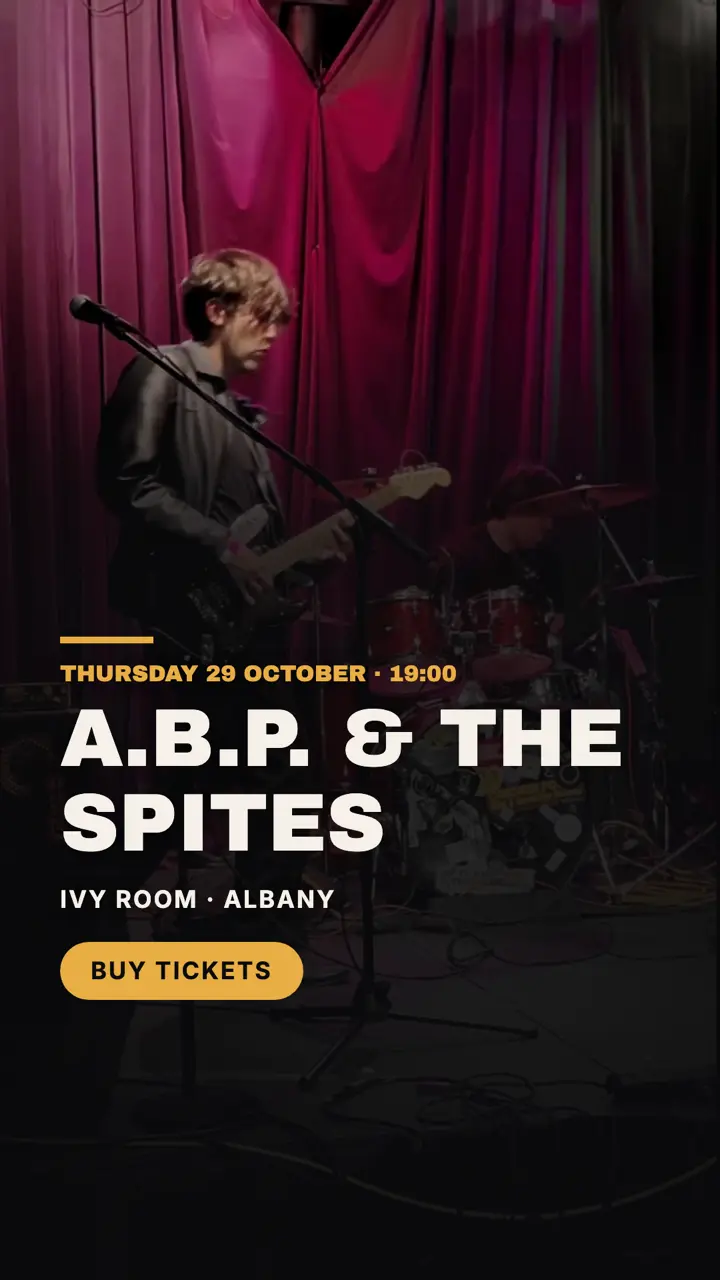
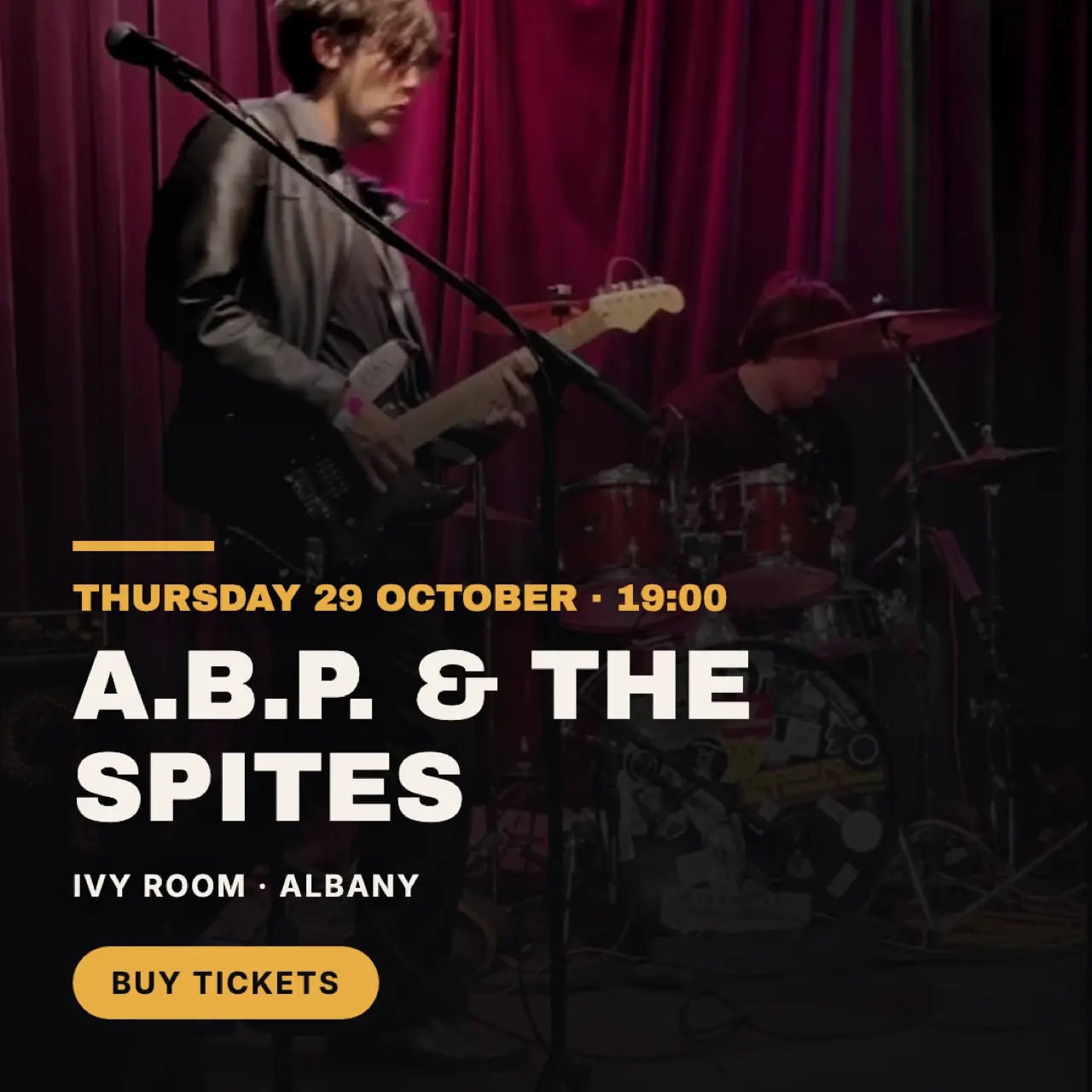
Drumroll was given the band’s footage and the show’s venue and date. Here is what it made: vertical videos, a poster for each in 9:16 and 1:1, and their captions. One short clip makes one video; more footage makes two.

Example · real band and show · used with their permission

Garage grit unleashed, 9:16 poster: A.B.P. & The Spites · Thursday 29 October · 19:00 · Ivy Room · Albany · Buy tickets
Garage grit unleashed9:16
Garage grit unleashed, 1:1 poster: A.B.P. & The Spites · Thursday 29 October · 19:00 · Ivy Room · Albany · Buy tickets
Garage grit unleashed1:1

Albany · Ivy Room · 29 Oct · A.B.P. & The Spites
1 clip · 16 s · venue and date

See the whole example

Six exports, or one review

A full package is two videos and four posters. Here is what that takes by hand, and what’s left for you with Drumroll.

By hand

×6
  1. Scrub the song for the part that should carry it
  2. Find the best clips and cut them to the beat
  3. Type the city, venue and date
  4. Export, then do it again for the second video
  5. Lay out the posters, vertical and square
  6. Notice the date is hidden under the Like button
  7. Fix it, check it isn’t too quiet, export again

Six exports, six chances to get the date wrong.

With Drumroll

×1
  1. Send the clips and the show’s date and venue
  2. Check the videos on your phone
What comes back
  • 2 vertical videos, cut from your material
  • 4 posters, 9:16 and 1:1, with the date and place
  • 6 files, named, captioned and checked
New showNorthside Horns
A song · optional
Low Lights0:58 · MP3
Ready
Your footage3 clips · 2 photos
0:42
0:48
0:19
+2
The showFrom your ticket link
  • 20 NovStockholm · The Lantern Room
Make my videos

Uses 1 of your shows. You get two videos to review.

Starting a show on a phone: the footage, an optional song, and the venue and date read from a ticket link.

You bring the footage. Drumroll does the cutting.

Most promo video is still made by hand, one show at a time, which is hard to keep up for every night on the calendar. Drumroll starts from the artist’s own material and asks you for one review. The videos are cut from the artist’s own footage, never from stock clips.

  1. 1

    Send what you have

    Phone clips from last night, rehearsal or live video with its own sound, or a photo and a song. Paste the ticket link and Drumroll reads what it can; type in the rest.

  2. 2

    Review the videos

    Drumroll makes two videos from your material. Keep each one, or change its words, where the clip starts, its style or its sound.

  3. 3

    Download and post

    Two vertical videos, four posters and their captions, named and checked. You post them yourself, wherever you like.

Two videos, and the last word is yours

Drumroll finds the strongest moments in your footage and makes two videos in two styles, one cut to the beat. It writes the on-screen text and a caption for each. The date and venue come from the facts you confirm, never made up by the AI.

Something off? Change that video: the on-screen text, the caption, where the clip starts, the style or the sound. Drumroll makes a new version for you to check.

Example: the first of two videos, with its on-screen text and caption, Keep and Pass buttons, and the parts of a video you can change: text, start, style and sound.

9:160:15

One night onlyCopenhagen · 18 Nov

Video 1 of 2

Montage

Your live clips, cut to the beat, with the city and date on screen.

On-screen text
One night only
Caption
Copenhagen, 18 November. Tickets at the link.
KeepPass
Change this video

Two rounds of changes per show, within 7 days.

Quality gate · 6 files

6 of 6 passed
  • Loudness−14.1 LUFSBetween −18 and −12 LUFS, aimed at −14
  • True peak−1.2 dBTPBrought down from +0.4 dBTP on the promo cut, so re-encoding can’t clip it. Your master file is never changed
  • Black framesNoneNo black stretch of 0.5 s or longer before the end card
  • Text in safe area4 of 4 linesClear of captions and buttons on Reels and TikTok
  • Length15.0 sWithin 0.2 s of the planned cut
  • Footage sharpness1080×1920Shots too small to hold up at full size are flagged

Checked before you ever see it

Every video gets the checks a careful editor makes: not too quiet or too loud, no black gaps, and no text hiding under the captions and buttons.

A video that fails a check is held back, not sent to you.

The loudest nightBerlin · 14 Nov

The text is kept clear of the captions and buttons on Reels and TikTok, so the date stays readable.

For artists

Review on your phone. One link, two videos to keep or change, and the files are ready to post.

  • Keep or change each video from your phone
  • The date and place on every file, from your ticket link or what you type in
  • Built from your footage and your look
  • LOUD.
    Stockholm · The Lantern Room · 20 NovReview the videos
    Review
  • Low
    Berlin · 14 Nov6 files
    Ready to post

For managers, venues and agencies

One account holds every artist you promote. Start a show for each. Ask the band to look before it goes out. You stay in charge of what posts, and you see who you’re waiting on.

Run a venue or promote shows? See how a pilot works

  • HOME.
    Northside HornsStockholm · The Lantern Room · 20 Nov
    Waiting on the band
  • Glass
    Mara LindBerlin · 14 Nov
    Drumroll is making it
  • K/Y
    Kestrel YouthCopenhagen · 18 Nov
    Ready to post

Questions people ask first

Do I need editing skills?
No. You keep each video, or change its words, where it starts, its style or its sound. Drumroll does the cutting, resizing and checking.
What’s in a package?
Everything for one show: two vertical videos cut from the artist’s own material, each with a poster in 9:16 and 1:1 and a caption to post it with. The date and place are on every file. One short clip makes one video and its posters.
Is it made by AI?
Partly. AI picks the moments in your footage and drafts the on-screen text and captions. Every shot is the artist’s own footage or photo, never stock, and the date, venue and city come only from the facts you confirm.
What does it cost?
Your first two shows are free, and you don’t need a card. After that a show is SEK 299, and you see the price before anything is charged.
What do I need to start?
A clip or two with sound, at least 8 seconds each: phone clips, rehearsal video, live recordings. No usable clip? A photo and a song work too. Paste the ticket link and Drumroll reads what it can; type in the rest. You confirm them either way.
What if my footage isn’t great?
Phone clips are what most bands send. Drumroll picks the strongest moments and puts the sharpest, best-lit frame on each poster. It can’t rescue a clip that’s very dark or very small, so send two or three if you can.
Who owns the videos?
The artist. They keep every right to their footage and to the videos made from it. If you make them for an artist, agree how you’ll use them, as with any press material.
Can my manager run it for me?
Yes. Your manager, venue or agency starts the show and sends you a link. You send your clips, look at the videos and say Looks good or ask for a fix, on your own phone.
Every show deserves a drumroll.

Tell us who you are and what’s coming up. We reply within two working days, and your first two shows are free.

Who are you?
Your next show Optional

We use these details only to reply to you about Drumroll, and delete them whenever you ask. Privacy notice